



 Newsletter
A-PDF Number online help
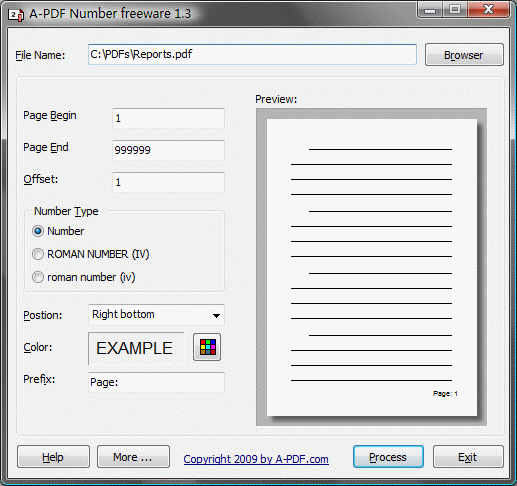
A-PDF Number is a free software utility program that adds/creates page number in .pdf files which are compatible with Adobe Acrobat Reader Version 5 and above.
The program is a standalone application. No Adobe Acrobat needed.
|
File name
|
What is base PDF file, which you want to add page number to.
|
|
|
Page Begin
|
The begin of page you want to add page number to. The minimality is 1.
|
|
|
Page End
|
The end of page you want to add page number to. If you will add to last page, simply input a large number. The maximality is 999999.
|
|
|
Offset
|
The start number in the first number adding.
|
|
|
Number Type
|
Select a page number type. There are three types to choose:
|
|
|
Postion
|
Select page number postion. There are three postion to choose:
|
|
|
Color
|
Select page number color, using the buttom  |
|
|
Prefix
|
The page number prefix. Such as "page ". | |
|
Process
|
When you press Process button, the Windows ‘save as’ dialog box opens to allow you to save the new file with page number to another file name. |
Contact us | Newsletter |
 Follow us
| Flip
HTML5 | Flip
Builder | Free
Office | Free Presentation Tool
Follow us
| Flip
HTML5 | Flip
Builder | Free
Office | Free Presentation Tool
Follow us
| Flip
HTML5 | Flip
Builder | Free
Office | Free Presentation Tool
Copyright 2003-2019 by A-PDF.com