



 Newsletter
A-PDF Watermark

A-PDF Watermark is a fast desktop utility program that lets you batch add image and text watermarks to Acrobat PDF documents. You can create watermarks with file names, company logos, signatures and product pictures, etc. Another convenient features are print directly and hot directory monitor.
A-PDF Watermark support show watermark only when printing PDF document and hide when viewing.
You also can see A-PDF Watermark Service: windows services program which can run in the background to add watermarks to PDF files automatically.

|

|

|
||
| only $35 Get a free license >> |
Free download trial version | See examples created by A-PDF Watermark |
How A-PDF Watermark Work
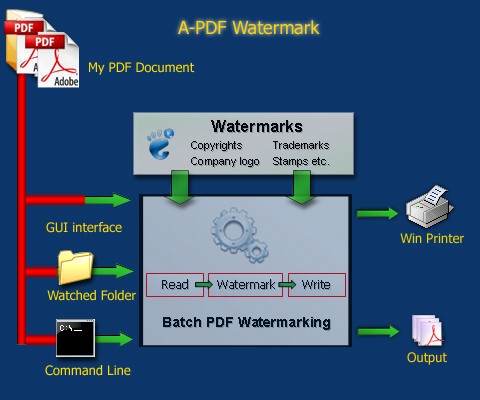
Why A-PDF Watermark
Protect your copyrights using visible watermarks
Use company logo, your name or web address as watermark to protect your PDF files.
Add stamp to your PDF files
You can add stamps of date, time, page number, author and filename to PDF pages.
Label PDF file status
What status of your PDFs, draft, approved, final or confidential? Using A-PDF Watermark, you can label them easily.
5 types of watermark
- Text - supports macro, such as date, time etc.
- Image - supports various image formats.
- PDF - supports one page or multi-page PDF files.
- Sharp - supports line, rectangle and circle.
- Dynamic Datetime - supports dynamic date/time changed when open.
Print without saving
You can add watermarks to PDF files only at print time, instead of saving then print them. Supports watermark and print a range of pages
Create watermark only show for printing
Add a "Print Only" Watermark to PDFs, watermark only show when actually printed.
Work with Hot Directory
You can set up a monitored directory, where all files written to that directory will be added watermark as they are saved. The original files can also be moved to a backup directory. All of the operations will be recorded in log files.
Using /H parameter, you can start the software with hot directory mode.
support for FTP transfers or e-mail watermarked PDF
A-PDF Watermark can ftp transfers or e-mail your watermarked PDF directly.
Powerful watermark setting
- Supports text watermarks with macros (dynamic text).
- Supports image watermarks with various image formats (eg. JPEG, GIF, TIF, TIFF, PCX, PNG, TGA, ICO, BMP, JP2 image formats).
- Supports watermarks at any position on the page. Includes header, center and footer.
- Using margins, watermark can be placed in an exact position, or tile to pages.
- Rotates watermarks to any angle.
- Supports opacity (transparent watermarks) for text and images.
- Support transparent color for images.
- Supports standard font and true type font, font size, text color, and text style.
- Support link to web site(URL), inner page and other PDF file.
- Support add watermark to part of pages, e.g. odd pages.
- Supports true type font, embedded or not.
- Watermarks can be placed on top or in background of page.
- Supports watermark and print a range of pages one step at a time without modifying the original pdf file.
- Supports page scale (%) settings before apply watermark.
- Supports backup source PDF before apply watermark.
Save Your Time
Using pre-made watermarks or those created by yourself, you can batch apply watermarks to a group of PDF files at one time.
Save Your Money
A-PDF Watermark is a standalone program costing only $35. It does NOT require Adobe Acrobat Pro, which costs hundreds of dollars.
A-PDF Watermark Command
A-PDF Watermark Command line (PWMCMD.exe) can be used as a Windows console utility that silent add watermark\stamp to the PDF file .
You can even use command line included to be called or scheduled. Learn more about A-PDF Watermark Command Line.
USAGE
PWMCMD <Input File> [-S<Password>] <Watermarks|wm file>
       [-O<Output File Name>] [-U"<Macro Name>=<Macro Value>,
       <Macro Name>=<Macro Value>,..."]

Return code:
0: Success
2: Input file does not exist
3: Load Input file failed
4: Output file error
5: Some watermark not found
6: No watermark list
7: Create Output file failed
8: Load watermark list fail

Example:
1. PWMCMD c:\pdfs\doc.pdf "Text - FINAL"'
2. PWMCMD c:\pdfs\doc.pdf "FINAL" "Com Logo" -O"c:\pdfs\out.pdf"'
3. PWMCMD "c:\pdfs\doc.pdf" "C:\Watermark\doMark.wm"
              -o"c:\pdfs\out.pdf"
4. PWMCMD c:\pdfs\doc.pdf "MacroWatermark" -O"c:\pdfs\out.pdf"
          -U"mymacroA=companyA,InputName=clientA"

MEMO: "Text - FINAL" is a watermark item defined by A-PDF
      Watermark GUI(PDFWM.exe), you can display all watermark
      items by Using Command: PWMCmd.exe -list
|
|
|
|
| only $35. Special Offers | Free download trial version |
See also




 Follow us
| Flip
HTML5 | Flip
Builder | Free
Office | Free Presentation Tool
Follow us
| Flip
HTML5 | Flip
Builder | Free
Office | Free Presentation Tool 