



 Newsletter
A-PDF Restrictions Remover
 Do you have a PDF (Adobe Acrobat) file which cannot be printed, copied, or edited? Your PDF file has had password security and other
restrictions added. Read more about PDF security »
Do you have a PDF (Adobe Acrobat) file which cannot be printed, copied, or edited? Your PDF file has had password security and other
restrictions added. Read more about PDF security »
With A-PDF Restrictions Remover, you can remove the password and restrictions in a few seconds. This program supports 40-bits/128-bits RC4 and 128-bits AES encryption.

|

|
|
| Only
$9.99 unconditional 30 Day Money Back Guarantee |
Download Free 15-day trial version |
Current version 1.6.9
Requirement: Windows 98/NT4/Me/2000/XP/7

Only $9.99
EASY to use
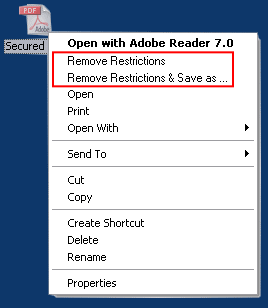
A-PDF Restrictions Remover is extremely easy to use. Just right click the PDF file in Windows Explorer, and in the context-sensitive menu that pops up, select either the "Remove Restrictions" or "Remove Restrictions & Save as..." option. In just a few seconds, you will have a PDF file with no restrictions. You can edit, print, copy, and more with your PDF files.
And you can quickly adjust 'settings' so that the original restricted files are preserved with a .BAK extension, and/or have them save to a different default directory.
Note: The context-sensitive menu feature now does not work on a 64bit win OS, we are still trying to find a solution.
FREE 15 day trial
Not sure if A-PDF Restrictions Remover will work for you?
Download it now for a FREE 15-day trial.
Pay only $9.99 and use it forever
YES! At $9.99, everybody can afford A-PDF Restrictions Remover.
Get free A-PDF Restrictions Remover »
Can NOT do
A-PDF Restrictions Remover can work to remove the restrictions in standard password protected PDF file, including 40-bit RC4 decryption, 128-bit RC4 decryption and 128-bit AES decryption.
But it can NOT:
- Remove or find the user/open password automatically. (The product may help you to find it »)
- Remove other protections, such as DRM or third part plug-in.
- Enable Acrobat Reader to
- Save forms and data locally
- Add comments
- Add digital signatures
Command line version
Do you need remove password and restrictions of a batch of files? Do you need process files in your script? You may need the command line version.
FAQ
Can the program remove the user password?
For removing user password prompts for opening your PDF file, you must initially provide the password. The program can not find the password automatically or simply delete it.
But you do not need input owner password, the program can delete it simply.
I can not see the options in context-sensitive menu popped up, why?
1, You must install the program using an administrator account
2, It may be caused by incorrect access control list (ACL) permissions on some registry hives. For repairing it, please use SubInACL tool of Microsoft and following the topic: http://blogs.msdn.com/astebner/archive/2006/09/04/739820.aspx
Can the program remove the Adobe DRM protection?
No. A-PDF Restrictions remover can only remove the protection of standard password with 40-bit, 128-bit RC4 or 128-bit AES encryption. It do not support Adobe DRM or other third part plug-in.
If you are still not sure if it would work for you, please feel free to download the trial version, which can be used free for 15 days.
Download the FREE 15-day trial of A-PDF Restrictions Remover here.
See also
- A-PDF Password Security
- A-PDF Restrictions Remover Command Line
- PDF Password Security
- Find PDF Password Tools
- Combine PDF files
- Split PDF flies
- LockLizard Safeguard PDF Security
- PDF Pssword Remover for MAC
- Unlock Secured PDF
- PDF Restrictions Clean
- PDF Security Remover
- Want more powerful program? Let us do a special one for you.
- Combine PDF files
- Split PDF flies
- LockLizard Safeguard PDF Security
PDF Security with DRM copy, print, and expiry controls. No passwords. Stops screenshots.

 Follow us
| Flip
HTML5 | Flip
Builder | Free
Office | Free Presentation Tool
Follow us
| Flip
HTML5 | Flip
Builder | Free
Office | Free Presentation Tool 