



 Newsletter
PDF Password Security
Protect or unprotect PDF files with Password security using our products.
 A-PDF Restrictions Remover |
 A-PDF Password Security |
 A-PDF Password Security Service |
|
| Decrypt PDF files * |  |
|
|
| Encrypt PDF files ** | |
|
|
| Change restrictions | |
|
|
| Support batch operations | |
||
| hot directory | |
|
|
| Password Pool | |
*** |
|
| Run as Windows Service | |
||
| Price | $9.99 | $27 | $99 |
| More detail Buy | More detail Buy | More detail Buy | |
| Buy All only $100 | |||
* Support 40-bit, 128-bit RC4 and 128-bit AES encryption
** Support 40-bit or 128-bit RC4 encryption
*** Need A-PDF Password Security (Desktop) to set password pool
About PDF Standard Password Security
The built-in encryption method provided by PDF allows for the following functionality. A document has two passwords: an owner password and a user password. The document also specifies operations that should be restricted even when the document is decrypted: printing; copying text and graphics out of the document; modifying the document; and adding or modifying text notes and AcroForm fields. When the correct user password is supplied, the document is opened and decrypted but these operations are restricted; when the owner password is supplied, all operations are allowed. The owner password is required to change these passwords and restrictions.
A document is encrypted whenever a user or owner password or restrictions are supplied for the document. However, a user is prompted for a password on opening a document only if the document has a user password.
How Can I Know If a PDF File Has Password Security?
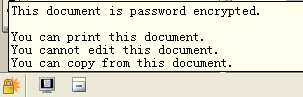
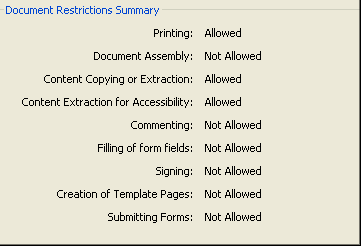
When you see the icon  at the bottom left of the Acrobat/Acrobat Reader program window, it indicates that the PDF file is secured. Place
your mouse cursor over that 'locked' icon, and you will see a listing of the security options that were applied to the file.
at the bottom left of the Acrobat/Acrobat Reader program window, it indicates that the PDF file is secured. Place
your mouse cursor over that 'locked' icon, and you will see a listing of the security options that were applied to the file.
For more information about a file's security settings, you can click "File|Document Properties"
in the Acrobat/Acrobat Reader menu bar. Then select the Security tab to show more detail about the file restrictions.
Note: if you are using Acrobat Reader, some restrictions will always be in effect , even if the file has not been encrypted, because Acrobat Reader does not allow comprehensive control. The restrictions may include: Document
Assembly, Commenting, Signing, etc.
LockLizard Safeguard PDF Security
PDF Security with DRM copy, print, and expiry controls. No passwords. Stops screenshots.
 Follow us
| Flip
HTML5 | Flip
Builder | Free
Office | Free Presentation Tool
Follow us
| Flip
HTML5 | Flip
Builder | Free
Office | Free Presentation Tool 