



 Newsletter
A-PDF Merger
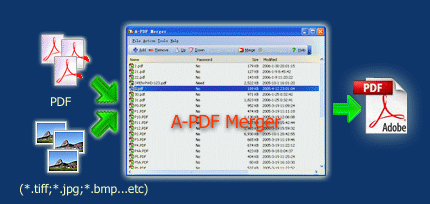
A-PDF Merger is a simple, lightning-fast desktop utility program that lets you combine two or more image files or Acrobat PDF files into a single PDF document. Office files can be merged if A-PDF Office to PDF installed. A-PDF Merger provides special merge methods that allow you to combine documents and document parts in a number of different ways to make your work more effective.

|

|
|
| only $35. Special Offers Get a free license >> |
Free download trial version |
Why A-PDF Merger
Combine Small PDF Files
For archiving, batch printing or merging reports/ebooks/data sheets, you need an easy tool to combine small pdf files into one. A-PDF Merger will even work with password-protected PDF files.
Convert Scanned Images to PDF File
A-PDF Merger supports popular image formats: TIFF (.tif), Multi-page TIFF, Windows bitmap (.bmp), GIF (.gif), JPEG (.jpg), Portable Network Graphics(.png), JPEG2000(.JP2, .J2K), Photo Shop Document(.psd), PCX, DCX, DIB, RLE, TGA, PBM, PGM, PPM, ICO, PCD, WMF, EMF, CUR.
Convert Office to PDF File
A-PDF Merger supports Microsoft Office Document formats: Word files(.doc), Word 2007 (.DOCX), Excel files(.xls), Excel 2007(.xlsx), Powerpoint files(.ppt), powerpoint 2007 (.pptx).
* You must install the A-PDF Office to PDF to support the office file converting.
Append Pages to Existing Documents
Appending or inserting pages(PDF file or image file) to an existing PDF file with A-PDF Merger is easy.
Special Merge Methods
Use special merge methods to rearrange the pages of PDF files. You can mix, reverse and repeat pages of source documents. Find more actual examples of using the merge methods.
There are 5 merge methods: Whole, Part, Mix, Mix reverse, Repeat.
Easy to Use
With the intuitive interface, the merging is as easy as 1-2-3:
- Add files by clicking the "Add" button
- Adjust the file order
- Click "Merge" button.
Save Time
A-PDF Merger's convenient features include 'drag and drop' for adding individual files to your documents, or even adding all files from a directory/folder with one click, as well as allowing you to create an 'import' list for frequently used sets of documents.
A-PDF Merger has great performance with optimized merging speed.
Work with Bookmarks
A-PDF Merger is able to join the bookmarks in source files and save to the output PDF file.
Create Output File with User-defined Settings
A-PDF Merger's features include the ability to change the Properties of the output PDF document, change its security settings, bookmarks, and how a merged pdf file is displayed(view layout). You can even add your own style and format of page numbering to the output PDF.
Save Money
A-PDF Merger is a standalone program costing only $35. It does NOT require Adobe Acrobat Pro, which costs hundreds of dollars.
|
|
|
|
| only $35. Special Offers | Free download trial version |
Tips of A-PDF Merger
A-PDF Merger is so versatile and feature-packed that it’s the equivalent of a Swiss Army knife for PDFs! Following are a few short tips on how to use some of the A-PDF Merger application features.
- Convert Images to a PDF file using A-PDF Merger
- Add/remove security settings for a PDF file using A-PDF Merger
- Modify Properties of a PDF file using A-PDF Merger
- Add page numbers to a PDF file using A-PDF Merger
- Merging Method actual examples
Multi-Language
A-PDF Merger support Multi-Language. Now you can download your language file at here. And get information how to translate it by clicking here. We offer a free license to translator whose language file has been accepted.
See also
- Manual
- A-PDF Command line version
- Free Combine PDFs for Mac OS X
- A-PDF Split
- Remove PDF Copy/Print Protection for Free
- Free Combine PDFs for Mac OS X
- PDF Combine
- PDF Joiner
- PDF Merge for Mac
- PDF Binder
- Want more powerful program? Let us do a special one for you.
Download slow? Try a mirror site instead
 Follow us
| Flip
HTML5 | Flip
Builder | Free
Office | Free Presentation Tool
Follow us
| Flip
HTML5 | Flip
Builder | Free
Office | Free Presentation Tool 
View Video
View Screenshot
Current version: 4.7.0
Requirement:
Windows 2000/XP/Vista/7
License