



 Newsletter
HEALTH INFORMATION AGGREGATOR
A-PDF is pleased to announce our collaboration with Laconic Systems (www.laconicsystems.com) to bring you Health Information Aggregator (HIA). Health information comes in many different ‘sizes and shapes’. This information needs to be mixed and matched in many different ways across the enterprise. PDF is the perfect “currency” for health information exchange (HIE). Healthcare workers need simple, straightforward solutions to solve their everyday needs for HIE. HIA was designed and built with these requirements in mind. Once you have all of your data digitized, there is no better way than HIA to selective choose, package and send it.
Full license price: $49

Making Patient Referrals
The hardest part of making a patient referral is simply collecting the data required to do so. No two referrals are quite the same, and selecting concisely what is needed is the key. Specialty consultants don’t want to waste their time sifting through garbage files that many EMRs produce. send them the good, useful information only!
Release of Information
Because of the extreme complexity and highly regulated nature of healthcare delivery, there are a myriad of needs for ‘release of information’ transactions. HIA is the perfect tool to efficiently gather any type of file format, and quickly get it to where it needs to go, while being compliant with security and HIPAA standards.
Quick Start
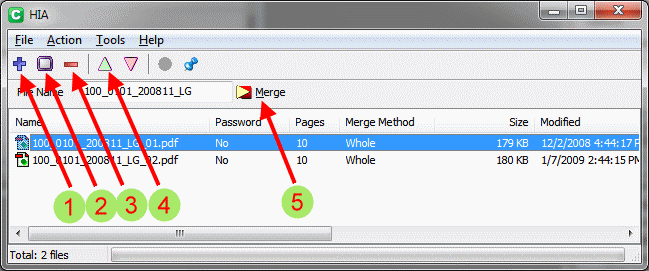
refer to above numbered arrows
- Click the blue ‘plus’ sign to add a file, then double tap the file you wish to add.
- Click the square icon to do a ‘screen capture’, then drag the resultant ‘+’ on the now darkened screen to outline the part of the screen you wish to capture, then click the green ‘check’ icon.
To bring to the screen the image you wish to capture from another source (such as PACS image or EKG), you may need to ‘minimize’ HIA. - Use the ‘minus’ sign to delete a file by clicking it after you have clicked the file you wish to delete.
- Use the up and down arrows to move a file up or down in your list by tapping the appropriate arrow after tapping the file you wish move.
- After you have collected your files, fill your file name and click the merge icon.
PLEASE NOTE
HIA does not convert Microsoft Office files directly to PDF. Because of the many proprietary file formats in HIT, for simplicity, we have provided a ‘screen capture’ functionality that you can use to turn Office docs and anything else directly to PDF. If you wish to turn Office docs directly to PDF, please purchase the ‘A-PDF Office to PDF’ program ( www.a-pdf.com/office-to-pdf), it is inexpensive and integrates nicely with HIA, as explained later in these instructions.
 Follow us
| Flip
HTML5 | Flip
Builder | Free
Office | Free Presentation Tool
Follow us
| Flip
HTML5 | Flip
Builder | Free
Office | Free Presentation Tool 