



 Newsletter
A-PDF PPT to PDF
A-PDF PPT to PDF is a fast, affordable utility to allow you to batch convert Microsoft PowerPoint 2000, 2003, 2007 presentations into professional-quality documents in the PDF file format. Support hot directory monitor and command line mode to convert PPT to PDF.

|

|
|
| only $39 Get a free license >> |
Free download trial version |
Work Example
download the exmple.ppt and example.pdf
Why A-PDF PPT to PDF
Easy to use
Converting Microsoft PowerPoint presentations into PDF files couldn't be easier.
Convert One File: Right-click a PowerPoint (.ppt) file and select "Convert to PDF" from the pop-up menu.
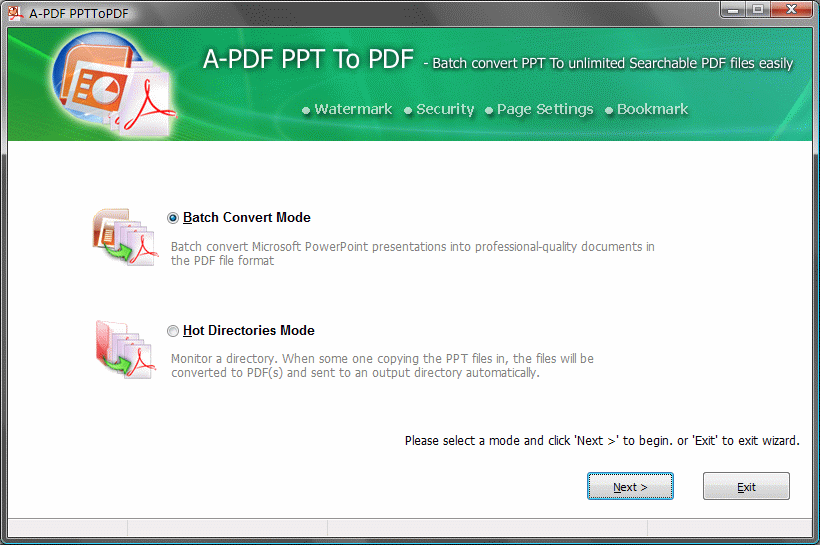
Convert a batch of Files: Simply drag the PowerPoint(.ppt) files you want to convert to the file list and click the "Convert to PDF and Save as" button. A-PDF PPT to PDF quickly re-creates your .ppt file as fully-formatted PDF files.
Convert the editing file with Powerpoint Add-Ins: Click the button  in the MS powerpoint toolbar.
Accurate
You will be amazed at the results you get from the PPT to PDF Converter. It accurately retains the layout of the original .ppt file. It converts text in over 100 languages, and separates graphics from tables and text.
Adjust page size to fit your PowerPoint slides, you can print to PDF with A3 or larger page.
Create Bookmark Using the Outline inside Presentations File
A-PDF PPT to PDF supports converting PPT outline or page number to PDF bookmark for easy navigation.
Create PDF file to an N-up page Layout
Create PDF file with simple N-up (2-up, 4-up, 6-up, 12-up, 16-up etc...) imposition and foldable booklet (4:1 2:3 ...) imposition.
Combine and Merge Multiple PPT Documents into single PDF
Create single PDF file from Multiple Powerpoint Documents with merge method
Work with Hot Directories
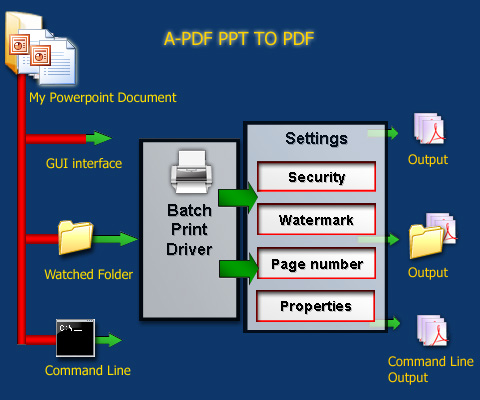
You can set up a monitored directory, where all Powerpoint files written to that directory will be converted to PDF as they are saved. All of the converting will be recorded in log files.
Save Time
- Handles a batch of files at one time.
- Context-sensitive menu (right click) supports one step converting.
- Add watermark, properties, security and page number in one step.
- Get the job done in seconds or minutes, not hours or days.
- Support Command Line.
Save Money
A-PDF PPT to PDF is a standalone program costing only $39. It does NOT require Adobe Acrobat Pro, which costs hundreds of dollars.
A-PDF to PPT to PDF Command Line
A-PDF to PPT to PDF Command line (ppttopdf.exe) can be used as a Windows console utility that silent convert powerpoint slides to the PDF file .
USAGE
PPTToPDF <input PowerPoint file> <output pdf file>

Return code:
1: Does not find GhostSrcript
2: Input file does not exist
3: Output file path not exists
5: Source file is not word file (.ppt, .pps, .pot etc)
6: Output file name error
8: Convert successfully
9: Convert Failed
10: Error because another A-PDF PPT to PDF is running.

An example:
PPTToPDF "c:\help.ppt " "c:\output\help.pdf"
|
|
|
|
| only $39. Special Offers | Free download trial version |
A-PDF PPT to PDF need Ghostscript, you can free download it here.
See also
Current version 4.9.0


Requirement:
- Windows NT4/2000/XP/Vista/7
- MS Powerpoint 97 or above
- Ghostscript


 Follow us
| Flip
HTML5 | Flip
Builder | Free
Office | Free Presentation Tool
Follow us
| Flip
HTML5 | Flip
Builder | Free
Office | Free Presentation Tool 